China is one of the most rewarding destinations on earth — and one of the most disorienting for a first-time Western traveler the moment you try to pull up Google Maps and get a spinning wheel. The good news: staying connected is very manageable once you understand how China's internet actually works. The trick is to set everything up before you fly, because many of the tools you'll need to fix the problem are themselves blocked once you land.

What the Great Firewall Blocks
China's national censorship system — nicknamed the Great Firewall (GFW) — filters internet traffic that crosses into and out of the country. For a Western visitor, that means a long list of everyday apps simply won't load on a normal Chinese connection:
- Google everything — Search, Maps, Gmail, Drive, Docs, Photos
- YouTube
- WhatsApp, Telegram, Signal, Facebook Messenger
- Instagram, Facebook, X (Twitter), Reddit, Snapchat, Pinterest
- Streaming & misc — Netflix, Spotify, Twitch, Wikipedia, and many Western news sites (BBC, NYT, Reuters)
Reassuringly, a few things usually still work: Apple iMessage and FaceTime typically function, and most banking and airline sites load fine. But assume your daily digital habits will break unless you plan around them.
Why a Travel eSIM Often Beats the Firewall — No VPN Needed
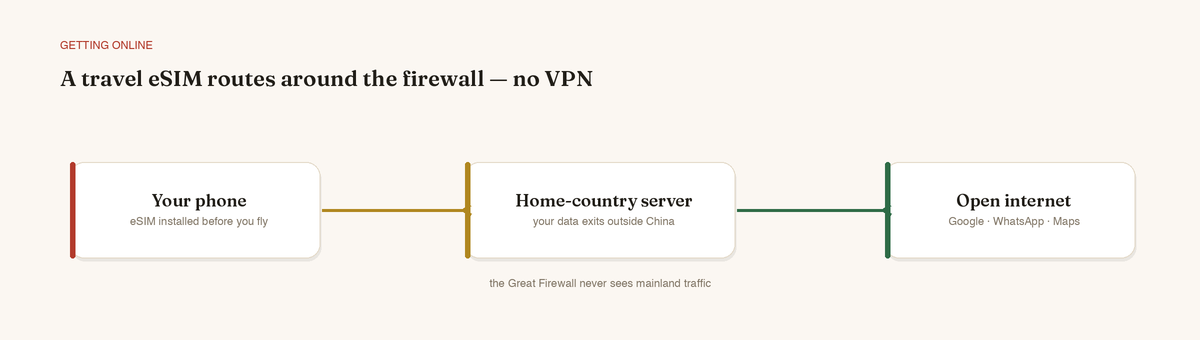
Here's the part that surprises people. A travel eSIM is a roaming SIM: it connects to Chinese cell towers for signal, but your actual data is routed out to a server in another country (often Hong Kong, Singapore, or Japan) before reaching the open internet. Because the Great Firewall only filters domestic Chinese connections, this international routing sidesteps the firewall entirely — no VPN required.
In practice, that means Google Maps, WhatsApp, and Instagram work on your eSIM data roughly as they do at home.
Pro tip: "Built-in VPN" is marketing. The real mechanism is roaming, not VPN tech — so don't pay a premium for that buzzword. Just confirm the plan routes traffic abroad (virtually all China travel eSIMs do).
Two caveats worth knowing: - Exit-point distance affects speed. eSIMs that exit via nearby hubs (Hong Kong, Singapore) feel snappier than those routing through Europe or the US. - Buy enough data before you go. Due to local rules, you generally cannot top up or purchase eSIM plans once inside China, so size your plan for the whole trip plus a buffer.
VPN: Choose It and Install It BEFORE You Arrive
A VPN is still your best backup — useful if you want blocked apps on hotel Wi-Fi, on a local SIM, or if an eSIM underperforms in a particular city.
The single most important rule: download, install, log in, and test your VPN before you cross the border. VPN provider websites and app-store listings are themselves frequently blocked inside China, so a half-installed VPN is nearly impossible to finish on the ground.
A few honest pointers, with no single brand guaranteed:
- Pick providers with a track record in China and active obfuscation (stealth) servers — performance shifts constantly, so reputation alone isn't enough.
- Install two different VPNs. When the GFW tightens, one may stutter while another holds.
- Save offline copies of login credentials and the provider's support contact.
Pro tip: Test each VPN at home by connecting to a China-optimized or stealth server, then load a blocked site. If it works smoothly before you fly, you've removed 90% of the on-the-ground risk.
eSIM vs. Roaming vs. Local SIM
| Option | Firewall bypass? | Best for |
|---|---|---|
| Travel eSIM | Usually yes (routes abroad) | Most travelers — instant, app-based, no VPN needed |
| Home carrier roaming | Often yes (also routes home) | Short trips; convenient but can be pricey |
| Local Chinese SIM | No — full firewall + needs VPN | Long stays, cheapest data, local number |
For a one- or two-week trip, an eSIM is the sweet spot. A local SIM is cheapest for long stays but lives behind the firewall, so you'd lean on your VPN constantly — and registration requires your passport.
The Local Apps That Replace the Blocked Ones
Honestly, the smoothest experience comes from embracing the Chinese app ecosystem. Download these before you arrive (Google Play is blocked):
- Maps: Install AMap Global — the English overseas edition of Amap (Gaode) with a fully English interface and superb live transit. Note: the plain domestic "Gaode / 高德地图" app is Chinese-only and needs a mainland phone number, so grab AMap Global specifically. Baidu Maps is a backup, strongest in rural areas.
- Ride-hailing: DiDi (China's Uber) — now with an English interface, foreign-card support, and upfront pricing. Also lives inside WeChat.
- Food & services: Meituan and Ele.me for delivery, bookings, and tickets.
- Messaging & payments: WeChat and Alipay are the indispensable "super apps." Link a foreign Visa/Mastercard in advance; cash is nearly extinct.
- Translation: Pleco is the gold-standard dictionary, with a live camera mode that translates menus and signs on screen.

Practical Setup Order Before You Fly
- Install & test your VPN(s) on every device.
- Download the local apps — WeChat, Alipay, Amap, DiDi, Meituan, Pleco.
- Set up WeChat & Alipay payments, linking a foreign card and verifying your identity.
- Buy your travel eSIM, generously sized; install the profile but wait to activate per the provider's instructions.
- Save offline maps in Amap and download any offline translation packs.
Troubleshooting on the Ground
- eSIM apps not loading? Confirm Data Roaming is ON for the eSIM line and that it's set as your data line.
- A VPN won't connect? Switch to a different protocol or stealth server, or try your backup VPN.
- Payments rejected? Re-verify your card in WeChat/Alipay; some vendors only accept one of the two, so carry both.
- Slow speeds? Pick an eSIM/VPN endpoint geographically closer to China.

Pre-Departure Checklist
- [ ] VPN #1 installed, logged in, and tested on a blocked site
- [ ] VPN #2 (backup) installed and tested
- [ ] Travel eSIM purchased, sized for the whole trip
- [ ] WeChat installed with a foreign card linked
- [ ] Alipay installed and identity-verified
- [ ] Amap (+ offline maps) and Baidu Maps downloaded
- [ ] DiDi installed with English interface
- [ ] Meituan / Ele.me installed
- [ ] Pleco downloaded with offline pack
- [ ] Login credentials and support contacts saved offline
Set up correctly, you'll step off the plane and stay connected from minute one — firewall and all.