In 2026 the Great Firewall's deep-packet inspection spots plain IKEv2, WireGuard and OpenVPN the moment they connect, and quietly drops them. Commercial VPN apps come and go with each crackdown. The route that holds is a server you control, speaking an obfuscated protocol — and it's far easier to stand up than it sounds.
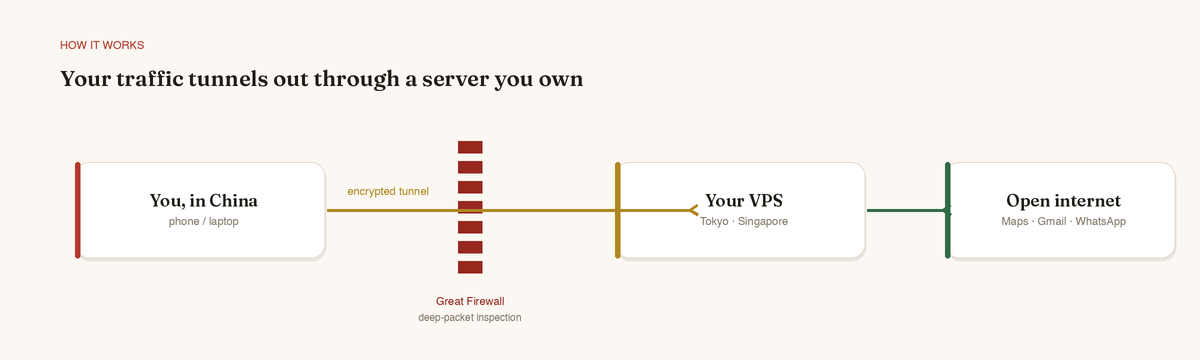
The idea is simple: you rent a cheap server outside China, and your phone builds an encrypted tunnel to it. To the firewall that traffic is either invisible or looks like something ordinary, so it passes through — and on the far side you reach the open internet as normal. Here are the two routes, one easy and one bulletproof.
First rule, and the one that catches everyone out: set this up and test it before you fly. VPN sites, app stores and your own server's control panel are all unreachable once you're behind the firewall.
Option A — Outline: easiest, about ten minutes
Outline is Google Jigsaw's open-source tool. It runs a Shadowsocks server for you with essentially one click, and gets through reliably — roughly 85–90% of the time. If you've never touched a server in your life, start here.
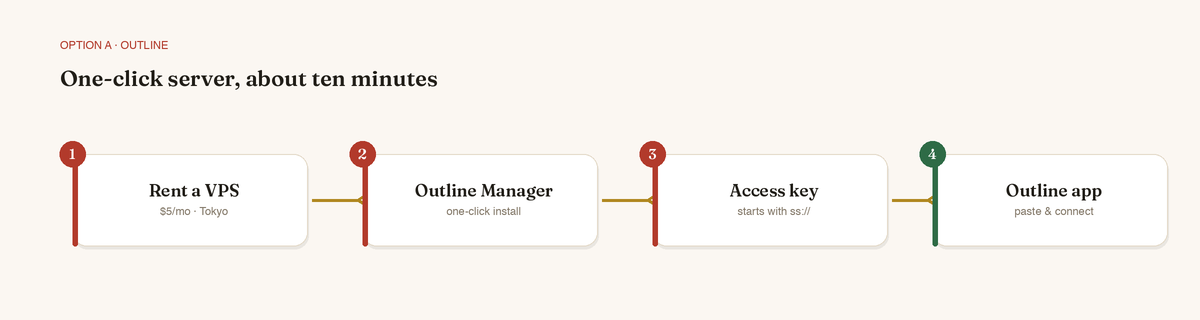
- Rent a small VPS near China. Pick a region with low latency to the mainland — Tokyo, Singapore or Hong Kong. Vultr and DigitalOcean both work and cost about $5 a month. Avoid the giant AWS/GCP IP ranges; the firewall batch-blocks them every night.
- Install Outline Manager on your laptop from getoutline.org. Point it at your cloud account, or paste in the server's IP address.
- Let it do the work. Outline Manager installs everything over SSH and hands you an access key that starts with
ss://. - Paste the key into the Outline app on your iPhone (it's free). You're connected.
If a server IP ever gets blocked, spin up a fresh one or change the port — it's a two-minute fix from Outline Manager, no reinstall.
Option B — VLESS-Reality: bulletproof, but advanced
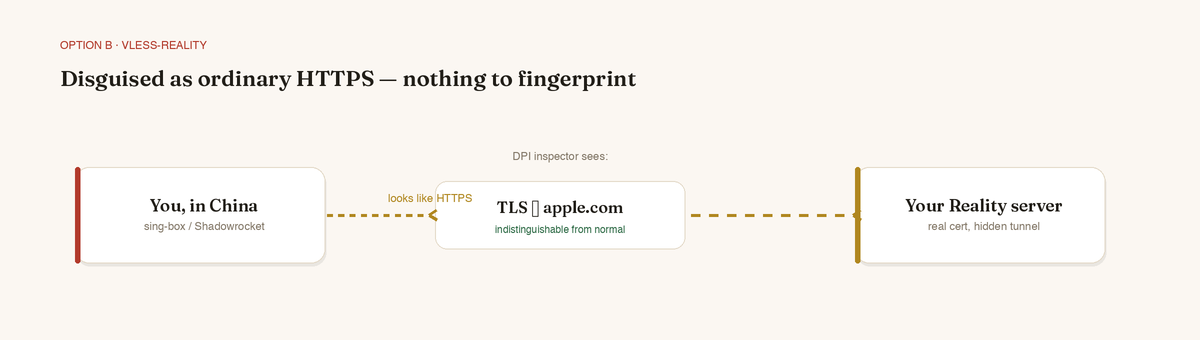
Reality is the state of the art for 2026. Instead of hiding that it's a tunnel, it disguises your traffic as an ordinary HTTPS handshake to a real, popular website — so the firewall's inspectors have nothing to fingerprint. Success rates sit above 95%. The trade-off is more moving parts.
- Same kind of VPS as above.
- Install a Reality-capable core on the server — sing-box or Xray. One-line community installers exist (the Xray-install and 233boy scripts are popular) and print a
vless://…realitylink or QR code at the end. - Import it into a client that speaks Reality on your phone — sing-box (free, open-source) or Shadowrocket (paid). Scan the QR or paste the link, and you're set.
Budget an hour the first time you do this. Once it's running, it's the most resilient setup you can carry.
Before you cross the border
- Test at home first. If it doesn't work on your home Wi-Fi, it won't magically work in China — and you won't be able to fix it from there.
- Keep two ways online. A travel eSIM routes around the firewall with no VPN at all; pair it with your own server so that when one stutters, the other holds.
- Save your access key or QR offline — in your notes, a screenshot, a password manager. Anywhere you can reach without already being online.
A server of your own means you keep your normal life — Maps, Gmail, WhatsApp, your bank — wherever you travel. Set it up before you go, respect local laws, and the firewall becomes a non-event.